


The difference between a delay that improves your playing and one that muddies your tone often comes down to tempo sync. Even the most beautiful delay tone falls flat when it clashes with the song’s rhythm.
Tap tempo delay pedals solve this problem immediately. Tap a footswitch in time with the beat, and your delay locks to the tempo. No menu diving, no calculations, no guesswork.
In the past, I used to manually adjust my delay time knobs between songs, constantly fighting against drift as tempos shifted. The first time I used a delay with tap tempo, the difference was incredible. I could make my delays fit perfectly in time, every time.
Whether you’re switching between songs live or tracking multiple tempo sections in the studio, tap tempo delay keeps your sound tight and musical. Analog and digital options each bring different characteristics. But, understanding what you actually need will help you choose the right tool for your playing.
In this guide, you’ll learn exactly how tap tempo delay pedals work and how to use them effectively in real-world situations.
New to delay pedals? Learn everything you need to know in our article Guitar Delay Pedals: How They Work, Types & Setup Guide.
Key Takeaways
- Tap tempo is a performance tool. Change it between sections, follow tempo shifts, and let it change your delay to fit your music.
- Tap the footswitch 2-4 times steadily in rhythm with the song. The pedal reads the interval and sets your delay time automatically.
- Your tapping accuracy determines delay accuracy. Inconsistent taps cause timing drift. Practice with a metronome to develop steady timing.
- Use subdivisions creatively. Quarter notes reinforce the beat. Dotted eighths create cascading delays. Triplets add swing. Switch between them for different song sections.
- Common fixes: If delays sound off-tempo, tap again rather than adjusting knobs.
What Is Tap Tempo Delay?
Instead of twisting knobs and hoping you’ve dialed in the right milliseconds, tap tempo delay lets you set your delay time by tapping a footswitch in rhythm with the song. The pedal calculates the timing for you.
The mechanics are simple. Tap the footswitch two or more times at your desired tempo, and the pedal sets the delay time to match. Some pedals include tap tempo as a dedicated footswitch, while others integrate it into multifunction switches or external controllers.
The pedal reads the interval between your taps and converts that into delay time. Tap quarter notes, and you get quarter-note repeats. Tap eighth notes, and the delays come faster.
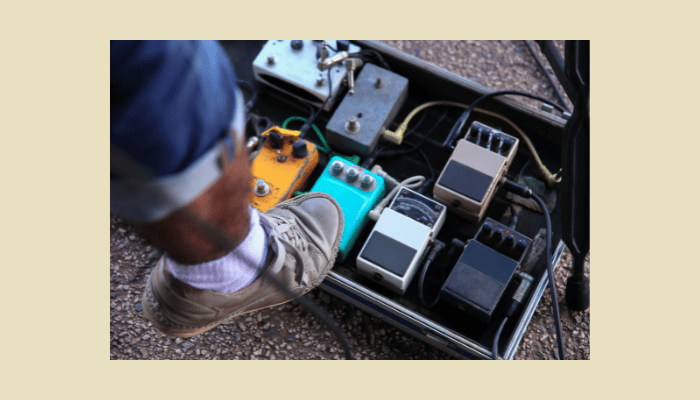
This becomes essential in live settings where you’re moving between songs at different tempos. Instead of bending down to adjust knobs between every song, you tap the new tempo and keep playing.
The practical benefit is immediate sync. The creative benefit is everything that becomes possible when your delays sit perfectly in the rhythm. Dotted eighths, triplets, slapback that breathes with the groove.
Why Sync Delay to the Beat?
I’ve heard countless concerts where beautiful delay tones turn into rhythmic chaos because the timing was off by just 20-30 milliseconds. What is intended to enhance the groove instead creates a distracting echo that pulls focus from the music.
When your delay matches the tempo, it reinforces the song’s rhythm instead of fighting against it. The repeats land between your notes naturally, creating space and depth without cluttering the mix.
Tap-tempo-synced delays work with your playing, not against it:
- Repeats accent the rhythm rather than obscure it
- Delays keep up with tempo changes and dynamic shifts
- The muddy overlap that happens when delays drift out of time? Gone.
- Each timing choice becomes a deliberate arrangement decision
Live situations make this even more critical. Tempos shift slightly between verses and choruses, or the drummer pushes the tempo as energy builds. A tap tempo delay pedal lets you adjust in real time. Tap the new tempo between phrases, and your delays stay locked in.
For recording, precise delay sync becomes part of the arrangement. Quarter-note delays on verses, dotted eighths for ambient swells, eighth-note slapback on choruses. Each timing choice shapes how the part sits in the track.
To put it bluntly, the difference between amateur and professional-sounding delay often comes down to tempo sync.

Analog vs Digital Tap Tempo Delay Pedals
The analog versus digital delay pedal debate matters less than understanding what each type actually does to your sound. Both can sync to tempo. The difference is in tone character and feature depth.
Analog delay pedals use bucket-brigade circuits that naturally compress and darken repeats as they decay. Each repeat loses high-end clarity, creating that warm, murky quality players associate with vintage tape echo. The sound feels organic because the degradation is part of the circuit’s character, not a digital simulation.
Digital delay pedals reproduce your signal with precision. Repeats stay clear through multiple cycles, and you get exact timing control down to the millisecond. Most digital delays also include modulation, tap tempo subdivisions, and preset storage—features that analog circuits can’t provide.
Here’s what actually matters for your decision:
- Sound Character
Analog gives warm, degraded repeats; digital delivers pristine clarity - Feature Set
Digital pedals usually offer tap tempo subdivisions, presets, and modulation options - Musical Context
Analog suits vintage tones and texture; digital fits precise rhythmic work and ambient soundscapes
Finding a tap tempo analog delay narrows your options significantly. Most analog delays with tap tempo cost more because adding digital timing control to an analog circuit requires additional components. The MXR Carbon Copy Deluxe and Boss DM-2W are notable examples that combine analog tone with tap tempo functionality.
Digital tap tempo delay pedals dominate the market because the feature integrates naturally with digital processing. You’ll find more options at every price point, with features like dotted-eighth subdivisions and MIDI sync that analog circuits simply can’t provide.
The practical choice depends on your priorities. If you need versatility and precise rhythmic control, digital delivers. If you want that degraded, lo-fi character and don’t need extensive features, analog delay with tap tempo can be worth the investment.
Both types serve real purposes. Understanding the tradeoffs helps you choose the tool that fits your actual playing needs.
Key Features of Tap Tempo Delay Pedals
Understanding what each control actually does helps you use tap tempo delay pedals effectively rather than just tweaking knobs randomly.
The tap tempo function itself sets delay time by reading the interval between your footswitch taps. Tap quarter notes at 120 BPM, and the pedal calculates roughly 500 milliseconds of delay time. This real-time adjustment eliminates the guesswork of manual timing and keeps your delays locked to tempo as songs change.
Feedback controls how many repeats you hear before they fade out. Low feedback gives you one or two clear echoes. High feedback creates cascading repeats that can build into self-oscillation if you push it far enough.
This is where slapback delays and ambient washes live at opposite ends of the same control.
Most tap tempo delay pedals include these core delay features:
Mix Control balances your dry signal against the delayed repeats. Unity mix (50/50) works for ambient parts where delay becomes the primary texture. Lower mix settings (20-30%) keep delays subtle beneath rhythm playing without obscuring your direct tone.
Subdivisions transform how delays interact with rhythm. Quarter-note delays reinforce the beat. Dotted-eighth delays create that U2-style cascading effect. Triplet subdivisions add swing. Many digital tap tempo delay pedals include multiple subdivision options you can switch between mid-song.
Modulation adds movement to the repeats. Subtle chorus that fattens the delay tail or pronounced vibrato that creates tape-warble effects. This feature bridges the gap between clean digital delays and the natural instability of analog or tape echo.
How to Use a Tap Tempo Delay Pedal
Using a tap tempo delay pedal effectively comes down to understanding the workflow and developing consistent timing. The mechanics are straightforward. The skill is in applying them musically.
Start by connecting your pedal in the signal chain. Most players place delay after overdrive and modulation but before reverb. Power it up using a proper power supply. Batteries work in a pinch, but regulated power prevents voltage sag that can cause timing drift.
The tap tempo function requires you to tap the footswitch at least twice in rhythm. The pedal calculates the interval between taps and sets that as your delay time.
Tap steadily. Hesitant or rushed taps give you inconsistent timing that defeats the purpose.
Basic Setup Process:
- Run your guitar into the input, output to your amp or next pedal
- Use isolated power supply rated for your pedal’s requirements
- Hit the footswitch 2-4 times in rhythm with the song
After setting tempo, adjust the mix control to balance your dry signal against the delayed repeats. Start around 20-30% mix for rhythm playing where delays should enhance rather than dominate. Push it to 40-50% for lead work where you want the delay more present.
Feedback determines how many repeats you hear. Low feedback (one or two repeats) works for slapback and clean rhythmic delays. Medium feedback (3-5 repeats) suits most musical applications. High feedback creates ambient washes but can turn muddy during chord work.
If your pedal includes subdivisions, experiment with dotted-eighth and triplet settings beyond straight quarter notes. Dotted eighths create that cascading Edge-style delay. Triplets add swing to straight-time feels.
A few things worth practicing:
- Your tap timing directly affects delay accuracy. Sloppy taps mean sloppy delays.
- Begin with lower mix and feedback, then add more as needed.
- Match subdivision choice to the part’s rhythmic function.
I wasted months fighting against my tap tempo delay before I realized my inconsistent tapping was the problem, not the pedal. Once I practiced tapping steadily (using a metronome to develop the skill), the feature became immediately useful.
The pedal won’t fix poor timing, but it makes tempo-synced delays accessible without math or guesswork.
Creative Uses for Tap Tempo Delay
Tap tempo delay does more than keep your repeats in time. It becomes a compositional tool when you understand how timing choices shape musical texture.
Rhythmic subdivisions transform basic delays into intricate patterns. Quarter-note delays reinforce the pulse. Dotted-eighth delays create cascading, syncopated rhythms that work against straight time. Triplet subdivisions add swing feel to delays even when playing in straight eighth notes.
Most digital tap tempo delay pedals let you switch between these subdivisions mid-song.
Ambient soundscaping relies on longer delay times with high feedback. Set your tap tempo for half notes or whole notes, push feedback to near-oscillation, and layer chords or single notes. Each repeat builds on the previous one, creating dense harmonic clouds that evolve beyond what you’re actively playing.
Some creative applications worth exploring:
- Switch subdivisions between song sections. Quarters for verses, dotted-eighths for choruses.
- Try long delay times (half notes or slower) with high feedback for textural layers.
- Let tap tempo changes follow tempo shifts or create rhythmic tension.
- Gradually increase your tap tempo during a build section. The delay time shortens, creating urgency.
- Dramatically slow the tap tempo for a breakdown, letting delays stretch into spacious echoes.
- Dynamic expression through tempo manipulation adds movement to otherwise static parts. The trick is treating tap tempo as a performance parameter rather than a set-and-forget utility. Change it between sections. Use different subdivisions for different parts of the same song.
Master the fundamentals of tap tempo delay first, then experiment with musical applications that go beyond simple tempo sync.
Popular Tap Tempo Delay Pedals: Analog and Digital Picks
Selecting a tap tempo delay pedal comes down to understanding what you actually need versus what marketing promises. The market offers dozens of options, but a few pedals consistently deliver practical results.
Analog delay with tap tempo remains relatively rare because adding digital tap control to analog circuitry increases manufacturing complexity. The MXR Carbon Copy Deluxe stands out as one of the most accessible tap tempo analog delay options. It delivers that characteristic bucket-brigade warmth. Dark, compressed repeats. With the convenience of tap tempo control.
Digital pedals dominate the tap tempo delay market because the feature integrates naturally with digital processing. The Boss DD-7 represents the reliable workhorse category. Straightforward operation, multiple modes, and tap tempo that works consistently without glitches.
Analog Delay Tap Tempo Pedals
MXR Carbon Copy Deluxe gives you warm, musical analog tone with practical tap implementation. The modulation adds subtle movement to the repeats without overwhelming the core analog tone.

Way Huge Supa-Puss brings more features and higher price, but delivers vintage character.

Digital Delay Tap Tempo Pedals
Boss DD-7 is the reliable standard with multiple delay types. It’s not flashy, but it handles the fundamentals well.

TC Electronic Flashback x4 offers extensive presets and TonePrint customization. This flexibility appeals to players who want one pedal covering multiple delay characters, though it requires more time investment to learn the interface.
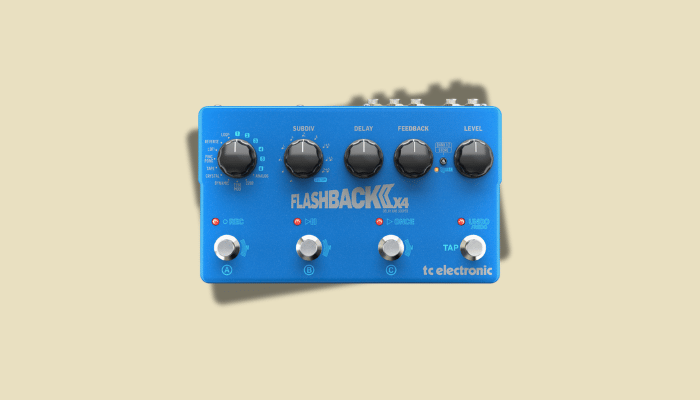
Your choice should match your actual playing context. If you need vintage analog warmth and don’t require extensive features, the Carbon Copy Deluxe delivers. If you want versatility and precise timing control, digital options like the DD-7 or Flashback provide more flexibility at comparable prices.
Troubleshooting and Tips for Live and Studio Use
Tap tempo delay pedals perform differently under live versus studio conditions. Understanding common issues and their solutions prevents problems before they derail your performance or session.
Live settings demand quick tempo adjustments between songs. Practice tapping tempo during rehearsals. Not just the mechanical action, but the timing accuracy under pressure.
When you’re between songs with the crowd watching, consistent tapping becomes harder than it sounds.
The most common live issue is tempo drift caused by inconsistent tapping. If your delay sounds slightly off-tempo, don’t immediately adjust the delay time knob. Tap the tempo again with more focus on steady timing.
Most “pedal malfunction” complaints I’ve heard traced back to rushed or erratic footswitch taps.
Power issues cause tap tempo failures more often than circuit problems. Underpowered pedals exhibit timing glitches, slower response, or complete tap tempo failure. Use isolated power supplies rated for your pedal’s current draw. Battery power works for backup, but voltage sag as batteries drain affects digital timing circuits.
Studio work requires different considerations. Delay with tap tempo stays consistent across takes when you maintain proper gain staging. High input levels cause digital clipping that manifests as grainy repeats or timing artifacts.
Excessive feedback or mix levels become more obvious in studio contexts where you’re hearing everything in detail. What sounds impressive soloed often clutters a full mix. Start conservative with 20-30% mix and 3-4 repeats, then adjust based on how the delay sits with other instruments.
A few practical tips:
- Loose cables cause intermittent signal that disrupts tap tempo tracking.
- Develop steady timing at various tempos. Use a metronome for training.
- Isolated supplies prevent voltage issues that affect digital timing.
- Lower mix and feedback for dense arrangements, higher for sparse sections.
- Keep your input signal strong but not overdriven unless that’s the intended character.
- Test your tap tempo delay setup before critical performances or sessions. Verify it responds consistently across the tempo range you’ll use.
Improve Your Sound with Tap Tempo Delay
Tap tempo delay pedals solve the fundamental problem of keeping your delays musically relevant as tempos change.
Real-time tempo adjustment matters most when you’re moving between songs at different tempos or working with sections that speed up or slow down. Instead of bending down to twist knobs between every tempo change, you tap the new timing and continue playing.
Analog delay with tap tempo combines vintage tone character with modern convenience. You get that warm, degraded repeat quality from bucket-brigade circuits with the flexibility of tap tempo control. Digital options provide precision timing, multiple subdivisions, and feature depth that analog circuits can’t match.
After years of using both types, I’ve found that the “best” delay with tap tempo is simply the one you’ll actually use consistently. Features don’t matter if the interface frustrates you or the workflow doesn’t match your playing context.
The creative possibilities extend beyond basic tempo sync. Subdivision switching, feedback manipulation, and tempo changes become performance parameters rather than fixed settings.
Start with the fundamentals. Accurate tapping, appropriate mix and feedback settings, reliable power. Master those basics, then experiment with the musical applications that make tap tempo delay more than just a convenience feature.
Your delays will sit in the mix naturally, support your playing rhythmically, and open sonic territory that manual delay time adjustment simply can’t access efficiently.
Frequently Asked Questions About Tap Tempo Delay
Musicians often have queries about tap tempo delay pedals. Here are the answers to some common questions.
How Does a Tap Tempo Delay Work?
It synchronizes delay time to the beat by tapping the pedal switch. This keeps the delay in time with the music.
Can I Use Tap Tempo with Any Genre?
Yes, tap tempo delay is versatile and works well across genres such as rock, blues, and electronic. It adapts well to different styles.
Do All Pedals Have Tap Tempo?
No, not every delay pedal includes a tap tempo function. Check specifications when purchasing to ensure the feature is present.
